VACUUM & TOAST: How PostgreSQL Cleans Dead Tuples and Stores Massive Values
Understand how VACUUM reclaims storage, how the Free Space Map works, and how PostgreSQL transparently handles oversized values using TOAST.
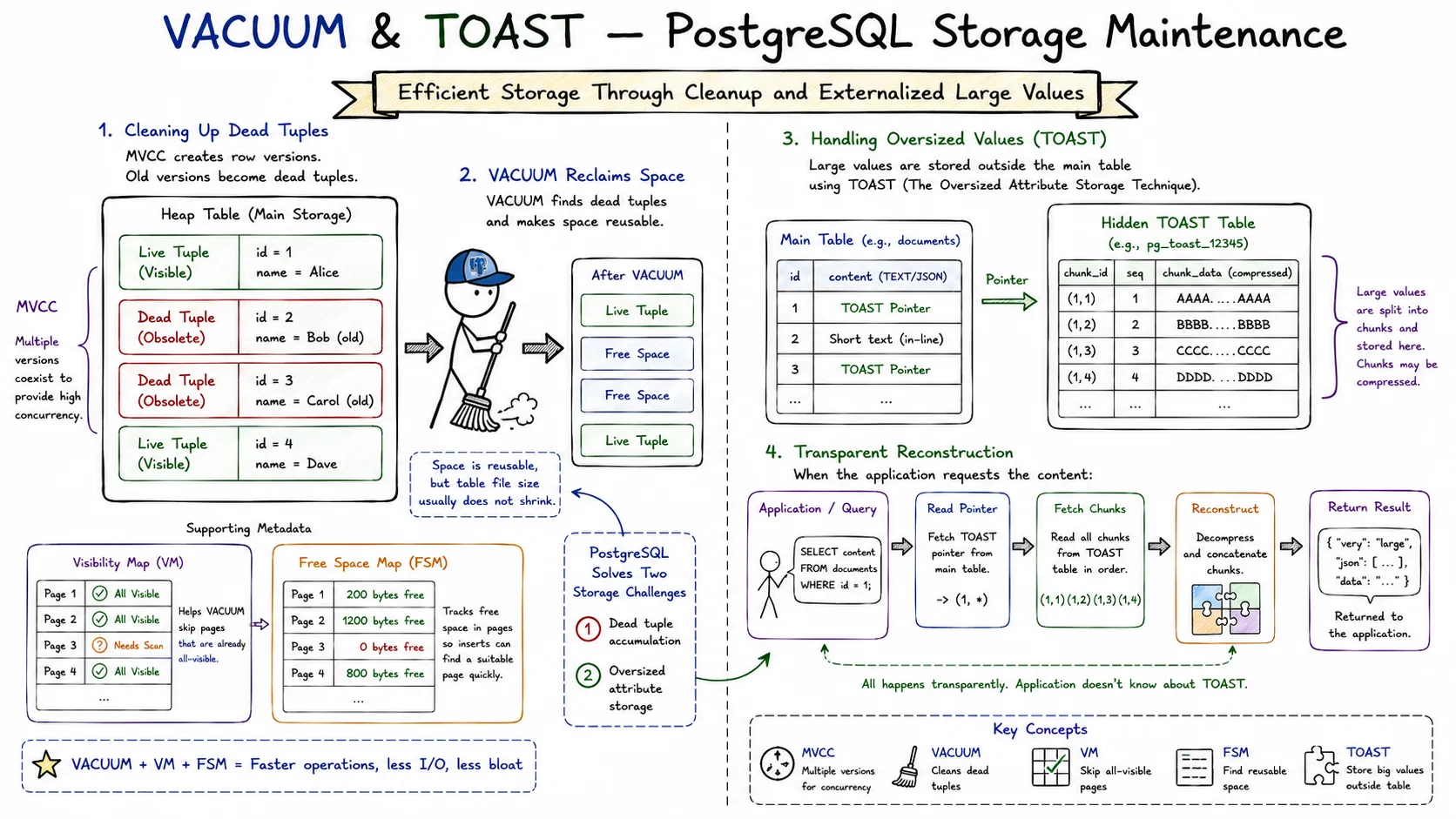
VACUUM & TOAST
PostgreSQL has a reputation for being extremely reliable under heavy concurrent workloads.
One major reason is its implementation of MVCC (Multi-Version Concurrency Control).
MVCC allows readers and writers to operate simultaneously without blocking each other.
The tradeoff?
Old row versions remain inside tables even after updates and deletes.
Over time these obsolete row versions, known as dead tuples, accumulate and consume storage.
This is where VACUUM comes in.
At the same time, PostgreSQL must also solve another problem:
What happens when a row contains extremely large values such as huge JSON documents or long text fields?
That is where TOAST enters the picture.
In this article we’ll explore:
- Why dead tuples exist
- How VACUUM cleans them
- The role of the Free Space Map (FSM)
- Why VACUUM does not usually shrink files
- How TOAST stores oversized values outside the main table
- How PostgreSQL transparently retrieves those values
Why Dead Tuples Exist
Consider a simple table:
CREATE TABLE users (
    id INT PRIMARY KEY,
    name TEXT
);
Insert a row:
INSERT INTO users VALUES (1, 'Alice');Later:
UPDATE users
SET name = 'Alice Cooper'
WHERE id = 1;
Many databases would overwrite the row.
PostgreSQL does not.
Instead it creates a brand-new row version and marks the old one as obsolete.
Internally:
Old Version -> Dead Tuple
New Version -> Live Tuple
This approach allows transactions that started earlier to continue seeing the old version safely.
The result is excellent concurrency but growing storage usage.

After enough updates:
Live Tuples: 10M
Dead Tuples: 4M
Those dead tuples consume disk pages and must eventually be cleaned.
What VACUUM Actually Does
A common misconception is:
VACUUM deletes rows from the table file.
That is not what happens.
VACUUM scans table pages and identifies tuples that are no longer visible to any active transaction.
Those tuples become reusable space.
The page remains part of the table.
The free space is simply marked as available for future inserts and updates.
Think of a parking lot.
A car leaves.
The parking spot becomes free.
The parking lot itself does not become smaller.
VACUUM works similarly.
Steps performed by VACUUM:
- Scan table pages
- Identify dead tuples
- Remove tuple references
- Mark space reusable
- Update visibility information
- Update free space metadata
Example:
Before VACUUM

Page 1
[Live][Dead][Live][Dead]

After VACUUM

Page 1
[Live][Free][Live][Free]
The table size often remains unchanged.
What changes is that PostgreSQL can reuse the free space.

The Visibility Map
Scanning every page during future VACUUM operations would be expensive.
To optimize this process PostgreSQL maintains a structure called the Visibility Map (VM).
The visibility map tracks whether a page contains tuples that are visible to all transactions.
If a page is known to be fully visible:
Visibility Map
--------------
Page 1 -> Visible
Page 2 -> Visible
Page 3 -> Needs Check
Future VACUUM operations can skip many pages entirely.
Benefits:
- Faster VACUUM
- Reduced I/O
- Better autovacuum efficiency
The visibility map is one reason PostgreSQL scales well on large datasets.

The Free Space Map (FSM)
Once VACUUM frees space, PostgreSQL must remember where that space exists.
Searching every page would be inefficient.
To solve this PostgreSQL maintains the Free Space Map (FSM).
The FSM stores approximate information about available space in pages.
Example:
Page 1 -> 200 bytes free
Page 2 -> 1200 bytes free
Page 3 -> 0 bytes free
Page 4 -> 800 bytes free
When PostgreSQL needs to insert a new row:
New Row Size = 700 bytesIt consults the FSM and quickly finds a suitable page.
Without FSM:
Scan entire table
Find space
Insert row
With FSM:
Check FSM
Locate page
Insert row
This significantly reduces disk activity.
The FSM is effectively PostgreSQL’s storage directory for reusable space.

Why VACUUM Doesn’t Usually Shrink Tables
One of the most common surprises for PostgreSQL users is:
VACUUM users;Yet the table size remains unchanged.
This is expected.
VACUUM:
- Reclaims internal free space
- Makes pages reusable
- Does not usually return disk space to the operating system
Imagine a 10 GB warehouse.
Removing boxes does not reduce warehouse size.
It only creates empty shelves.
VACUUM behaves similarly.
To physically shrink table files PostgreSQL needs:
VACUUM FULL users;However VACUUM FULL:
- Rewrites the table
- Requires additional disk space
- Acquires stronger locks
- Is significantly more expensive
Therefore normal VACUUM is preferred for day-to-day maintenance.
Autovacuum: VACUUM Running Automatically
Manually running VACUUM would be impractical.
PostgreSQL includes a background system called:
AutovacuumAutovacuum continuously monitors tables.
When enough updates or deletes occur:
Dead Tuples Threshold Reached
            ↓
      Autovacuum
            ↓
     Cleanup Starts
Benefits:
- Prevents table bloat
- Prevents index bloat
- Updates statistics
- Helps prevent transaction ID wraparound
Most production systems rely heavily on autovacuum.
Proper tuning of autovacuum settings is often critical for large workloads.

The Problem of Large Values
Consider:
CREATE TABLE documents (
    id BIGINT,
    content TEXT
);
Now insert:
INSERT INTO documents
VALUES (
    1,
    repeat('A', 500000)
);
A half-megabyte string cannot efficiently fit inside a normal heap page.
PostgreSQL pages are typically:
8 KBLarge values would quickly create storage problems.
PostgreSQL solves this using:
TOASTWhich stands for:
The Oversized Attribute Storage TechniqueHow TOAST Works
When a row becomes too large:
PostgreSQL automatically moves oversized columns into a hidden TOAST table.
Conceptually:
Main Table
-----------
id = 1
content -> TOAST Pointer

TOAST Table
------------
Chunk 1
Chunk 2
Chunk 3
Chunk 4
Instead of storing the huge value directly inside the row:
- The main table stores a pointer
- Actual data lives in TOAST storage
- PostgreSQL reconstructs the value when needed
Applications never need to manage this manually.
Everything happens transparently.

TOAST Compression
Before moving data externally PostgreSQL may compress it.
For example:
500 KB JSON
      ↓
Compression
      ↓
120 KB
If the compressed version becomes small enough:
Store inlineOtherwise:
Store externally in TOASTThis optimization reduces storage usage and I/O.
The exact strategy depends on:
- Data type
- Compression effectiveness
- Row size limits
Reading TOAST Data
Suppose a query accesses only metadata:
SELECT id
FROM documents;
PostgreSQL may never load the large TOAST value.
This saves significant I/O.
However:
SELECT content
FROM documents;
Now PostgreSQL:
- Reads pointer
- Loads TOAST chunks
- Reconstructs value
- Returns result
This allows large values to exist without slowing down unrelated queries.
VACUUM and TOAST Together
TOAST tables are ordinary PostgreSQL tables internally.
This means they also:
- Generate dead tuples
- Need VACUUM
- Participate in autovacuum
Example:
UPDATE documents
SET content = new_large_document;
The old TOAST chunks become obsolete.
VACUUM eventually cleans them.
So the lifecycle becomes:
Large Value Created
        ↓
Stored in TOAST
        ↓
Updated
        ↓
Old TOAST Chunks Become Dead
        ↓
VACUUM Cleans Them
This ensures TOAST storage remains healthy over time.
Key Takeaways
- MVCC creates dead tuples rather than overwriting rows.
- VACUUM reclaims dead tuple space for reuse.
- VACUUM usually does not shrink table files.
- The Visibility Map helps VACUUM skip unnecessary pages.
- The Free Space Map tracks reusable space.
- Autovacuum performs cleanup automatically.
- TOAST stores oversized values outside the main table.
- TOAST may compress data before external storage.
- TOAST tables themselves require VACUUM.
- Together VACUUM and TOAST allow PostgreSQL to scale efficiently while maintaining high concurrency and storage flexibility.