PostgreSQL Row-Level Locks and Deadlocks Explained
Understand how PostgreSQL row-level locking works, how deadlocks form, how PostgreSQL detects them, and practical strategies to avoid them.
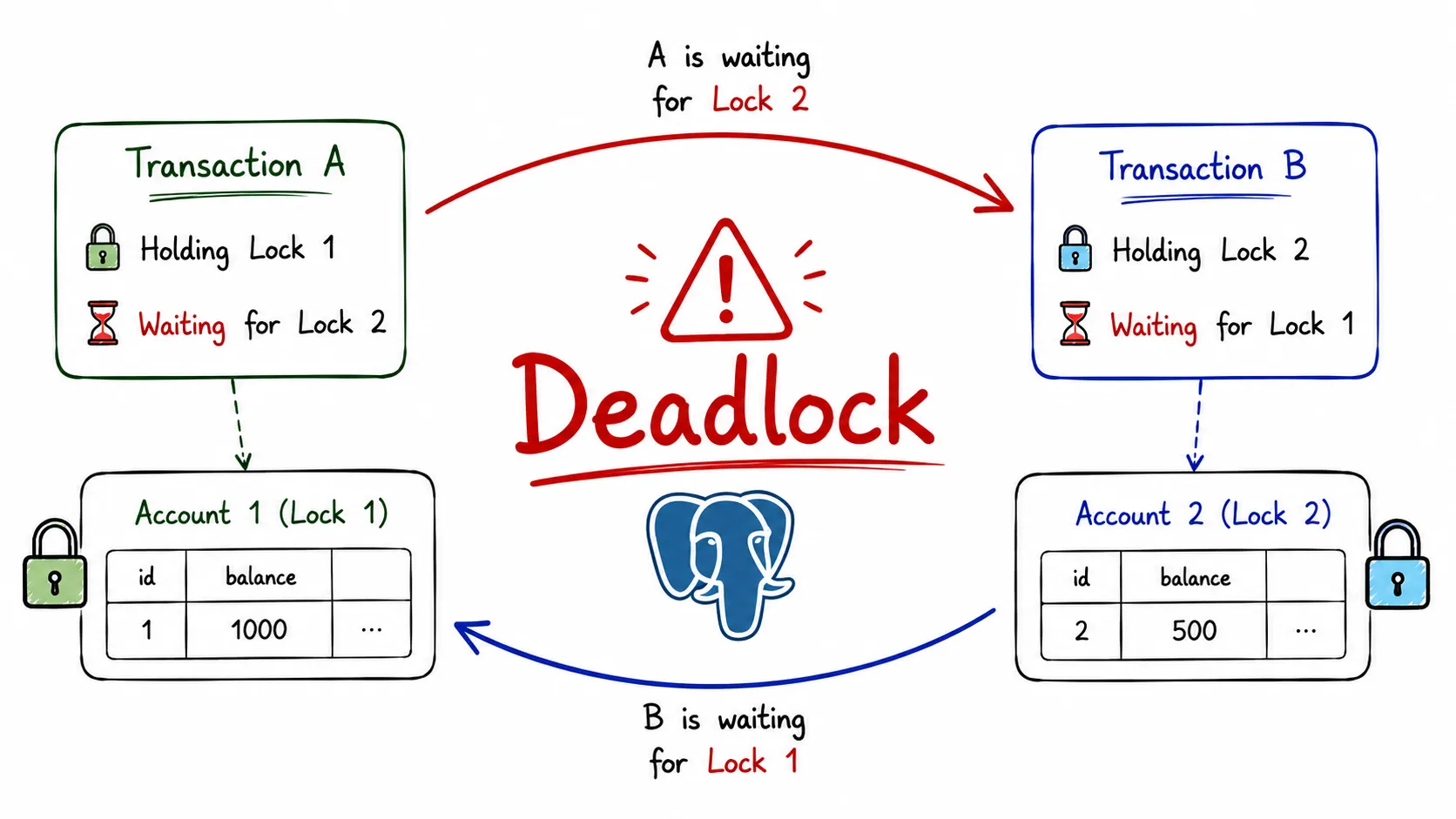
Most concurrency problems aren’t caused by PostgreSQL being slow. They’re caused by multiple transactions trying to modify the same data at the same time. When that happens, PostgreSQL has to decide who gets access first, who waits, and what happens if nobody can proceed.
Understanding row-level locks and deadlocks is one of those topics that completely changes how you think about transactions in production systems.
Why PostgreSQL Needs Locks
In the previous articles, I discussed MVCC and Isolation Levels. MVCC allows readers and writers to work concurrently without blocking each other most of the time.
But MVCC alone cannot solve every concurrency problem.
Imagine two transactions trying to update the same row:
BEGIN;

UPDATE accounts
SET balance = balance - 100
WHERE id = 1;
At exactly the same moment:
BEGIN;

UPDATE accounts
SET balance = balance + 50
WHERE id = 1;
If both transactions modified the row simultaneously, data corruption would be possible.
To prevent this, PostgreSQL uses row-level locks.
MVCC protects readers from writers. Locks protect writers from other writers.
What Is a Row-Level Lock?
A row-level lock is a lock applied to a specific row rather than an entire table.
When a transaction modifies a row using:
UPDATEDELETESELECT ... FOR UPDATESELECT ... FOR NO KEY UPDATE
PostgreSQL automatically acquires a lock on that row.
Other transactions can still read the row thanks to MVCC, but conflicting writes must wait.

Example
Transaction A:
BEGIN;

UPDATE users
SET email = 'new@example.com'
WHERE id = 1;
PostgreSQL acquires a row lock.
Before Transaction A commits:
BEGIN;

UPDATE users
SET email = 'another@example.com'
WHERE id = 1;
Transaction B waits.
Only after Transaction A commits or rolls back can Transaction B continue.
Locking Reads
Sometimes I want to lock a row before updating it.
That’s where SELECT ... FOR UPDATE becomes useful.
Example:
BEGIN;

SELECT *
FROM accounts
WHERE id = 1
FOR UPDATE;
The row is now locked.
Any other transaction attempting:
UPDATE accounts
SET balance = balance + 100
WHERE id = 1;
must wait.
This pattern is extremely common in:
- Payment systems
- Inventory management
- Reservation systems
- Order processing workflows
Why Not Just Read Normally?
Without locking:
SELECT balance
FROM accounts
WHERE id = 1;
Another transaction may update the row immediately after the read.
The application then makes decisions using stale information.
Using FOR UPDATE guarantees that the row remains stable until the transaction finishes.
The Different Row Lock Modes
Most developers only know about FOR UPDATE.
PostgreSQL actually supports several lock strengths.
| Lock Mode | Common Use |
|---|---|
FOR UPDATE | Prevent updates and deletes |
FOR NO KEY UPDATE | Default lock acquired by many UPDATEs |
FOR SHARE | Read while preventing modifications |
FOR KEY SHARE | Foreign key related operations |
FOR UPDATE
Strongest row lock.
Example:
SELECT *
FROM accounts
WHERE id = 1
FOR UPDATE;
FOR NO KEY UPDATE
Automatically used by many UPDATE operations.
Slightly weaker than FOR UPDATE.
Allows some foreign-key related operations to proceed.
FOR SHARE
Used when rows must remain unchanged while being examined.
SELECT *
FROM products
WHERE category = 'Laptop'
FOR SHARE;
FOR KEY SHARE
Weakest row-level lock.
Primarily used internally by foreign key operations.
What Happens When a Transaction Waits?
Suppose Transaction A locks a row.
Transaction B attempts to modify the same row.
PostgreSQL places Transaction B into a wait state.
During this period:
- CPU usage remains low
- Transaction B consumes a connection
- Application response time increases
Long waits are often the first sign of lock contention.

Detecting Blocking Queries
A common production question is:
Which transaction is blocking my query?
PostgreSQL exposes this information through system views.
SELECT pid,
       wait_event_type,
       wait_event,
       query
FROM pg_stat_activity;
Useful columns:
wait_event_typewait_eventstatequery
When troubleshooting lock issues, this is usually the first place I look.
Finding Blocking Sessions
SELECT pg_blocking_pids(pid)
FROM pg_stat_activity;
Example result:
[12345]Meaning transaction 12345 is blocking the current session.
Understanding Deadlocks
Waiting alone is not a deadlock.
A deadlock occurs when two or more transactions wait on each other in a circular dependency.
Neither transaction can proceed.
Example
Transaction A:
BEGIN;

UPDATE accounts
SET balance = balance - 100
WHERE id = 1;
Transaction B:
BEGIN;

UPDATE accounts
SET balance = balance + 100
WHERE id = 2;
Now Transaction A tries:
UPDATE accounts
SET balance = balance - 100
WHERE id = 2;
Transaction B tries:
UPDATE accounts
SET balance = balance + 100
WHERE id = 1;
Result:
Transaction A waits for Transaction B

Transaction B waits for Transaction A
Nobody can continue.
This is a deadlock.

The Wait Graph
Internally PostgreSQL builds a wait graph.
Imagine:
T1 -> waiting for T2

T2 -> waiting for T3

T3 -> waiting for T1
This forms a cycle.
As soon as PostgreSQL detects a cycle, it knows a deadlock exists.
The database must intervene.
How PostgreSQL Detects Deadlocks
PostgreSQL does not continuously scan for deadlocks.
Instead it waits for a short period controlled by:
deadlock_timeoutDefault:
1 secondIf the wait exceeds that duration, PostgreSQL analyzes the wait graph.
If a cycle is found:
- One transaction becomes the victim
- That transaction is rolled back
- Remaining transactions continue

Example Error
ERROR: deadlock detected

DETAIL:
Process 12345 waits for ShareLock on transaction 67890.
Process 67890 waits for ShareLock on transaction 12345.
This error is often alarming the first time you see it.
In reality, PostgreSQL is protecting database consistency.
How PostgreSQL Chooses a Victim
Once a deadlock is detected, one transaction must die.
PostgreSQL attempts to minimize wasted work.
Typically:
- Transaction with lower cost is selected
- Transaction is rolled back
- Locks are released
The surviving transaction proceeds normally.
Applications should always be prepared to retry failed transactions.
Preventing Deadlocks
The best deadlock is the one that never happens.
Access Rows in a Consistent Order
Bad:
Transaction A -> Account 1 -> Account 2

Transaction B -> Account 2 -> Account 1
Good:
Transaction A -> Account 1 -> Account 2

Transaction B -> Account 1 -> Account 2
Every transaction follows the same path.
No cycle can form.
Keep Transactions Short
Long transactions hold locks longer.
This increases:
- Contention
- Wait times
- Deadlock probability
I try to keep transactions focused on database work only.
Avoid User Interaction Inside Transactions
Bad:
BEGIN

Update row

Wait for user input

COMMIT
The lock may remain held for minutes.
Retry Deadlock Failures
Most production systems implement a retry strategy:
Deadlock → Rollback → Retry → SuccessMonitoring Lock Contention
SELECT *
FROM pg_locks;
Shows:
- Lock type
- Lock mode
- Relation
- Process ID
Combined with:
SELECT *
FROM pg_stat_activity;
it becomes possible to identify blocking chains and investigate lock contention in real time.
A Practical Rule I Follow
Most PostgreSQL concurrency problems aren’t caused by deadlocks themselves. They’re caused by transactions holding locks longer than necessary.
When I design transactional workflows, I focus on three things:
- Acquire locks as late as possible
- Hold locks for the shortest time possible
- Access shared resources in a consistent order
PostgreSQL’s deadlock detector is an important safety net, but relying on it regularly usually indicates that transaction design can be improved. Understanding row-level locks, wait graphs, and deadlock detection makes it much easier to build systems that remain predictable even under heavy concurrency.