Understanding PostgreSQL Query Lifecycle: Parse, Rewrite, Plan, Execute
Learn what happens inside PostgreSQL from the moment a SQL query arrives until the database returns the final result.
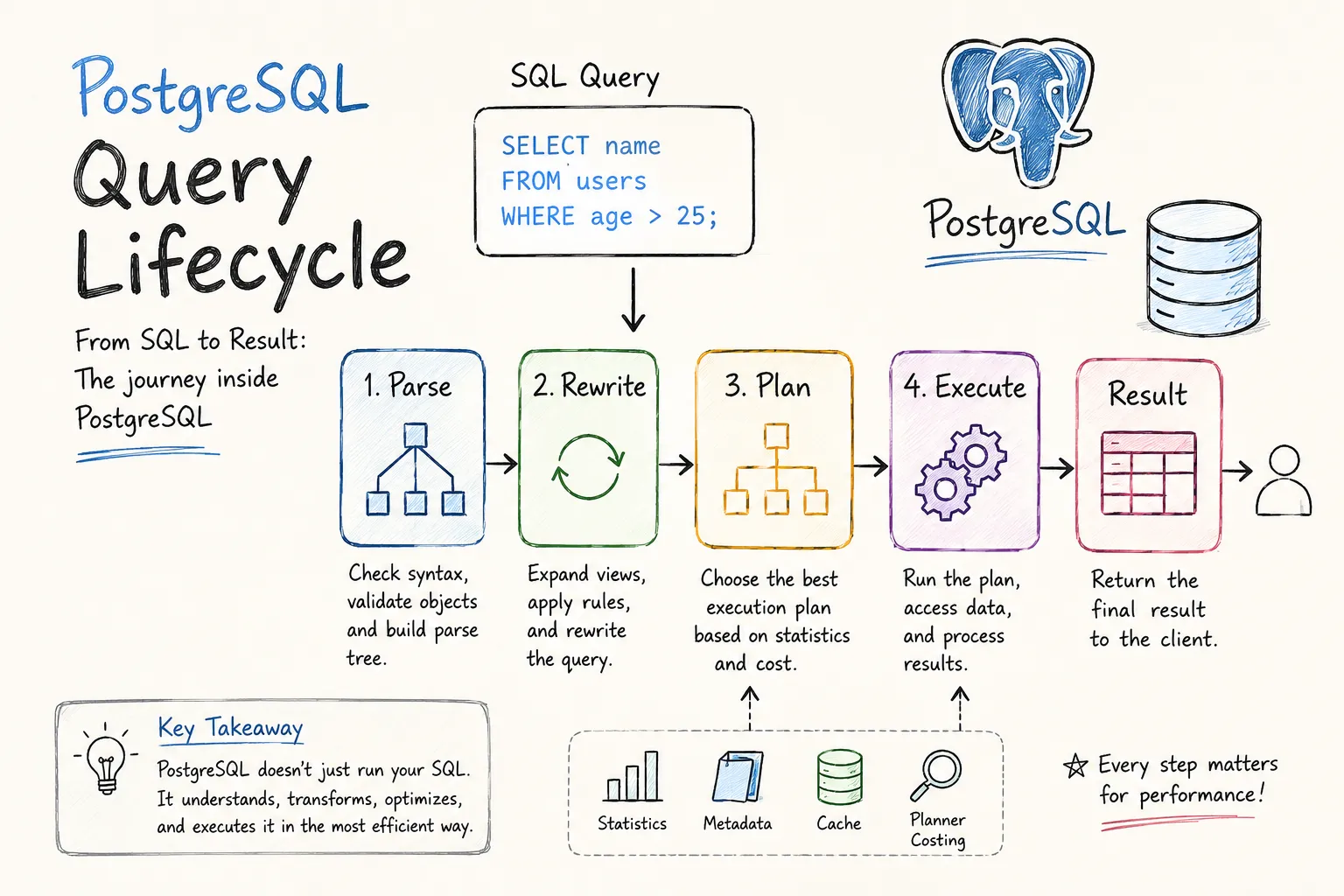
Every time I write a SQL query, I instinctively think about tables, indexes, and results. But PostgreSQL does a surprising amount of work before a single row is returned. Understanding this process completely changed how I look at query performance, execution plans, and database optimization.
Most developers interact with PostgreSQL through SQL statements, but internally PostgreSQL treats a query much more like a compiler treats source code. The query is parsed, transformed, optimized, and only then executed.
The Big Picture
At a high level, every query follows the same lifecycle:
SQL Query
    ↓
 Parse
    ↓
 Rewrite
    ↓
 Plan
    ↓
 Execute
    ↓
 Result
Each stage has a specific responsibility. PostgreSQL separates these concerns so it can understand the query, optimize it, and execute it efficiently.
The database does not execute your SQL directly. It first converts the SQL into an internal representation and decides the cheapest way to retrieve the requested data.
Let’s walk through each stage.
Parse Stage
The first thing PostgreSQL receives is a plain text SQL string.
SELECT name
FROM users
WHERE age > 25;
At this point, PostgreSQL has no idea what the query means. It only sees a sequence of characters. The parser is responsible for turning that text into a structured representation that PostgreSQL can understand.
Syntax Validation
The parser first checks whether the SQL follows PostgreSQL’s grammar rules.
A valid query:
SELECT * FROM users;An invalid query:
SELECT FROM users;The second query fails immediately because the syntax is incorrect. The query never reaches later stages.
Semantic Validation
Once the syntax is valid, PostgreSQL verifies that referenced objects actually exist.
It checks things like:
- Does the table exist?
- Does the column exist?
- Does the function exist?
- Does the user have permission?
For example:
SELECT username
FROM users;
If the username column does not exist, PostgreSQL throws an error before any planning or execution begins.
Internally, PostgreSQL converts the query into a structure called a parse tree, which becomes the input for the next phase.
Rewrite Stage
This is probably the least understood stage in the entire query lifecycle.
For most application queries, nothing interesting happens here. However, PostgreSQL still runs the rewrite phase because it is responsible for expanding views and applying query rules.
How Views Work
Consider this view:
CREATE VIEW adult_users AS
SELECT *
FROM users
WHERE age >= 18;
Now suppose I execute:
SELECT *
FROM adult_users;
Many developers imagine PostgreSQL treating adult_users like a physical table. That’s not what happens.
Instead, PostgreSQL rewrites the query into:
SELECT *
FROM users
WHERE age >= 18;
The planner never sees the original query.
It only sees the rewritten version.
Why Rewriting Matters
The rewrite system allows PostgreSQL to merge view definitions directly into the query before optimization begins.
For example:
SELECT *
FROM adult_users
WHERE id = 100;
Can effectively become:
SELECT *
FROM users
WHERE age >= 18
  AND id = 100;
This allows PostgreSQL to optimize the final query as if the view never existed.
A view is not stored data. It is a stored query definition that PostgreSQL expands during the rewrite phase.
For most everyday queries, the rewrite stage simply passes the query through unchanged.
Planning and Optimization
After rewriting, PostgreSQL has a complete query tree and can finally decide how to execute it.
This stage is where most performance decisions are made.
Multiple Ways to Execute the Same Query
Consider:
SELECT *
FROM users
WHERE id = 100;
There are several possible strategies:
- Sequential Scan
- Index Scan
- Bitmap Index Scan
PostgreSQL evaluates available options and estimates their cost.
The goal is simple:
Find the cheapest way to return the requested data.
Statistics Drive Decisions
PostgreSQL maintains statistics about tables and columns.
These statistics include:
- Row counts
- Distinct values
- Data distribution
- Null percentages
The planner uses these statistics to estimate how much work each strategy will require.
For example, if a filter returns most rows in a table, PostgreSQL may choose a sequential scan even when an index exists.
This often surprises developers, but from PostgreSQL’s perspective it can be the faster option.
Join Strategy Selection
Planning becomes even more important when joins are involved.
For a query like:
SELECT *
FROM users u
JOIN orders o
ON u.id = o.user_id;
PostgreSQL may choose:
- Nested Loop Join
- Hash Join
- Merge Join
The planner evaluates costs and picks the most efficient approach based on table sizes and available statistics.
Execution Stage
Once PostgreSQL has selected an execution plan, the executor takes over.
Unlike the planner, the executor does not make decisions. Its job is simply to follow the chosen plan.
If PostgreSQL selected an index scan, the executor:
- Opens the index
- Finds matching entries
- Retrieves the corresponding rows
- Returns the results
At this point the query is finally interacting with actual table data.
Memory and Disk Access
Execution speed depends heavily on where the data lives.
If the required pages are already present in PostgreSQL’s shared buffers, data can be returned directly from memory.
If not, PostgreSQL must fetch pages from disk.
Memory access is dramatically faster than disk access, which is one reason caching has such a large impact on database performance.
Viewing What PostgreSQL Chose
One of the most useful tools for understanding PostgreSQL internals is EXPLAIN.
EXPLAIN
SELECT *
FROM users
WHERE id = 100;
This shows the execution plan selected by the planner.
For deeper analysis, I usually use:
EXPLAIN ANALYZE
SELECT *
FROM users
WHERE id = 100;
Unlike EXPLAIN, this actually executes the query and reports:
- Actual execution time
- Actual rows processed
- Loop counts
- Cost estimates
This makes it possible to compare PostgreSQL’s predictions with reality.
Final Thoughts
Before learning about PostgreSQL internals, I assumed a SQL query was executed almost immediately after being sent to the database. In reality, PostgreSQL behaves much more like a compiler than a simple storage engine.
Every query passes through parsing, rewriting, planning, and execution before results are returned. Most performance issues are ultimately connected to the planning or execution phases, which is why understanding this lifecycle makes tools like EXPLAIN ANALYZE far less mysterious.
The next time a query feels unexpectedly slow, it’s worth remembering that PostgreSQL isn’t just executing SQL. It’s first deciding the smartest possible way to execute it.