PostgreSQL MVCC Explained: How Concurrent Reads and Writes Work Without Locks
Understand how PostgreSQL uses MVCC, row versions, xmin, and xmax to allow concurrent reads and writes without blocking.
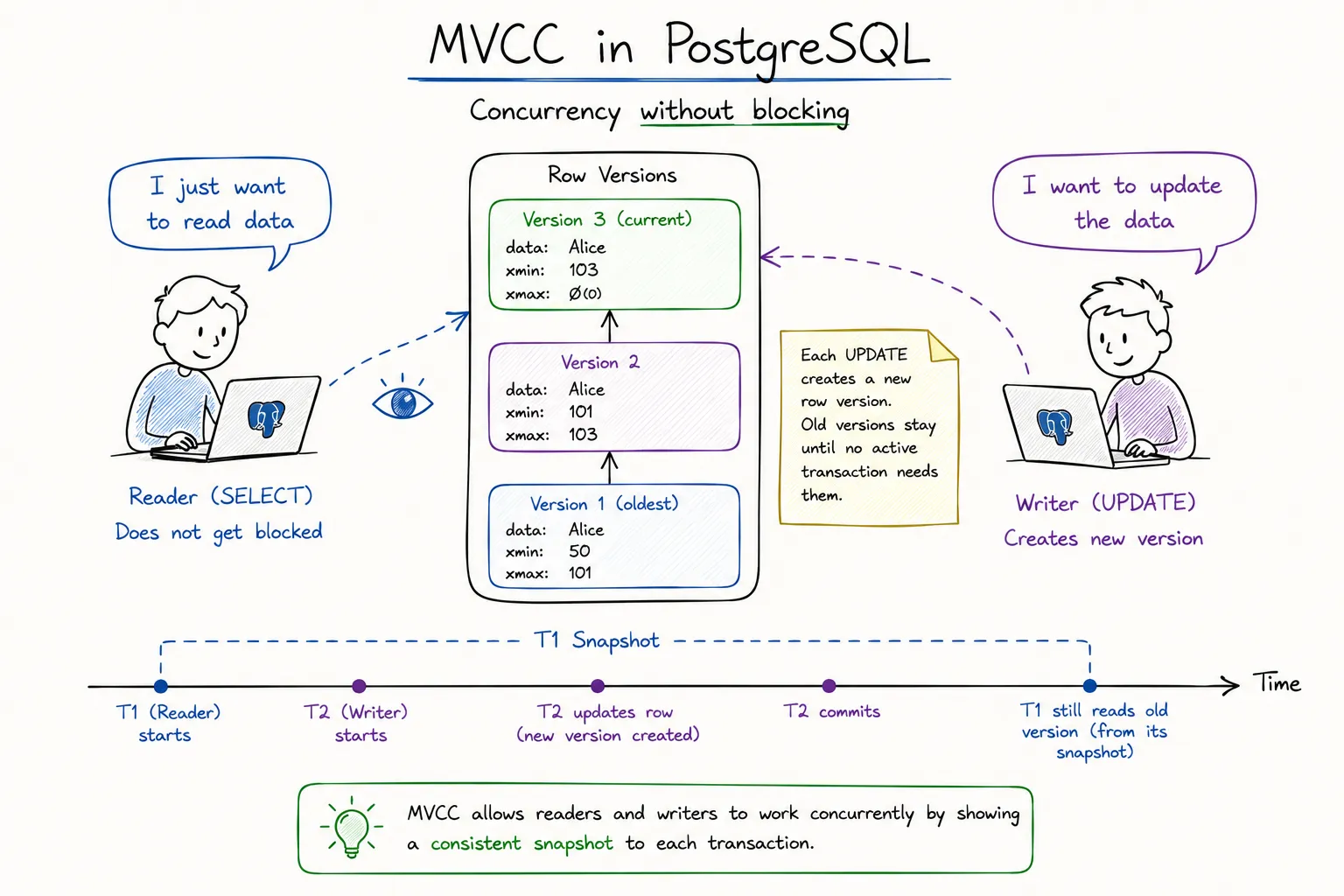
If you’ve ever wondered how PostgreSQL allows thousands of users to read and update the same table simultaneously without turning the database into a giant traffic jam, the answer is MVCC.
Before learning PostgreSQL internals, I assumed databases simply locked rows whenever someone modified them. While locks do exist, PostgreSQL relies heavily on a completely different mechanism called Multi-Version Concurrency Control (MVCC). Instead of blocking readers, PostgreSQL creates multiple versions of rows and decides which version each transaction is allowed to see.
By the end of this article, you’ll understand how row versioning works, what xmin and xmax actually mean, and why MVCC is one of the biggest reasons PostgreSQL scales so well under concurrent workloads.

The Problem MVCC Solves
Imagine a simple banking table:
CREATE TABLE accounts (
    id INT PRIMARY KEY,
    balance NUMERIC
);
Suppose User A starts updating a balance:
UPDATE accounts
SET balance = 5000
WHERE id = 1;
At the exact same moment, User B runs:
SELECT *
FROM accounts
WHERE id = 1;
Without MVCC, PostgreSQL would generally have two choices:
- Block User B until User A finishes
- Allow User B to read uncommitted data
Neither option is great.
Blocking reduces concurrency and hurts performance. Reading uncommitted data can return values that might later be rolled back.
MVCC solves this by allowing readers to continue accessing an older version of the row while writers create a newer version.
Readers don’t block writers, and writers don’t block readers.
That single design decision is responsible for a huge portion of PostgreSQL’s concurrency performance.
Understanding Row Versions
Most developers think an UPDATE modifies a row in place.
PostgreSQL doesn’t.
When you execute:
UPDATE users
SET email = 'new@email.com'
WHERE id = 10;
PostgreSQL actually:
- Marks the existing row as expired
- Creates a brand-new row version
- Updates indexes to point to the new version

Conceptually:
| Version | Status | |
|---|---|---|
| Row V1 | old@email.com | Old |
| Row V2 | new@email.com | Current |
The old row isn’t immediately deleted.
Instead, it remains in the table until PostgreSQL determines that no active transaction can possibly need it anymore.
This is why PostgreSQL tables accumulate dead tuples over time and eventually require VACUUM.
Every Row Has Hidden Metadata
Each PostgreSQL row contains hidden system columns.
Two of the most important are:
xminxmax
You can inspect them directly:
SELECT xmin, xmax, *
FROM users;
Most developers never query these columns, but MVCC depends on them constantly.
xmin
xmin stores the transaction ID that created the row.
Example:
| Row | xmin |
|---|---|
| User A | 100 |
This means transaction 100 inserted or created that row version.
xmax
xmax stores the transaction ID that deleted or replaced the row.
Example:
| Row | xmin | xmax |
|---|---|---|
| User A | 100 | 150 |
This means:
- Transaction 100 created the row
- Transaction 150 later invalidated it
A row with:
xmax = 0is considered currently alive.
Once an update occurs, PostgreSQL sets xmax on the old version and creates a new version with its own xmin.
Snapshots: The Secret Ingredient
Creating multiple row versions alone isn’t enough.
PostgreSQL still needs a way to decide:
Which row version should this transaction see?
The answer is a snapshot.
Whenever a transaction begins, PostgreSQL captures a snapshot of currently visible transactions.
For example:
BEGIN;The transaction now receives a view of the database frozen at a specific point in time.
Even if another transaction commits changes later, the current transaction may continue seeing the old versions depending on the isolation level.
This is why PostgreSQL can provide consistent reads without locking entire tables.
Snapshot Example
Assume:
Transaction 100 starts
Transaction 101 updates a row
Transaction 101 commits
Transaction 100 may still see:
Old row versionbecause its snapshot was taken before Transaction 101 committed.
A newer transaction will see:
New row versionThe same table can therefore appear different to different transactions simultaneously.

Visibility Rules
When PostgreSQL reads a row, it evaluates visibility rules based on:
- Transaction snapshot
- Row xmin
- Row xmax
- Transaction status
A row is generally visible when:
- Its creating transaction has committed
- Its deleting transaction has not committed
- The row existed at the moment the snapshot was taken
Think of visibility checks as a filter applied before rows are returned.
Heap Page
 ├── Row V1
 ├── Row V2
 ├── Row V3
 └── Row V4

        ↓

Visibility Check

        ↓

Rows Returned To Query
This process happens constantly during query execution.
Most of the time developers never notice it because PostgreSQL handles everything automatically.
Why MVCC Creates Dead Tuples
Every update creates a new row version.
That means old versions accumulate.
Example:
UPDATE products
SET price = 100
WHERE id = 1;
Repeated thousands of times:
Version 1
Version 2
Version 3
Version 4
Version 5
...
Eventually older versions become useless.
PostgreSQL marks these as dead tuples.
Dead tuples still occupy storage space until cleanup occurs.
This is where VACUUM enters the picture.
Without cleanup:
- Table size grows
- Index size grows
- Query performance degrades
- Storage usage increases
MVCC and VACUUM are tightly coupled concepts.
You can’t fully understand one without understanding the other.
Why PostgreSQL Doesn’t Need Read Locks
Many traditional databases rely heavily on shared locks.
A read operation might acquire:
Shared Lockwhile a write operation requires:
Exclusive LockThe result is contention.
PostgreSQL avoids much of this by letting readers access older row versions.
Consider:
SELECT * FROM orders;running at the same time as:
UPDATE orders
SET status = 'SHIPPED';
The reader simply sees the version that was visible when its snapshot was taken.
No blocking required.
This dramatically improves throughput in high-concurrency systems.
MVCC turns locking problems into visibility problems.
That’s a much cheaper problem to solve.
A Practical Example
Let’s walk through a simple sequence.
Transaction A:
BEGIN;

UPDATE accounts
SET balance = 2000
WHERE id = 1;
The old row:
balance = 1000
xmin = 50
xmax = 80
The new row:
balance = 2000
xmin = 80
xmax = 0
Before Transaction A commits:
Transaction B runs:
SELECT balance
FROM accounts
WHERE id = 1;
Transaction B still sees:
1000because the new version isn’t visible yet.
After Transaction A commits:
New transactions will see:
2000while older snapshots may continue seeing:
1000until they finish.
This is MVCC in action.
MVCC Tradeoffs
MVCC is incredibly powerful, but it isn’t free.
Benefits:
- High concurrency
- Consistent reads
- Reduced lock contention
- Better scalability
Costs:
- Additional storage usage
- Dead tuples
- Need for VACUUM
- Visibility checks during reads
PostgreSQL accepts these tradeoffs because the concurrency gains are usually worth it.
Modern OLTP systems would struggle to achieve the same throughput using heavy locking strategies alone.
Final Thoughts
MVCC is one of the most important PostgreSQL internals to understand because so many other features are built on top of it.
Concepts like:
- Isolation levels
- VACUUM
- Autovacuum
- Transaction snapshots
- Dead tuples
- Row visibility
all originate from MVCC.
The key idea is surprisingly simple:
Instead of modifying rows in place, PostgreSQL creates new row versions and uses snapshots to decide which version each transaction can see.
Once that clicks, a lot of PostgreSQL behavior suddenly starts making sense.
In the next article, we’ll build on this foundation and look at Isolation Levels, where we’ll see how PostgreSQL uses MVCC snapshots to prevent some anomalies while still allowing others.