Connection Pooling in PostgreSQL: Why PgBouncer Exists
Understand why PostgreSQL's process-per-connection architecture makes connection pooling necessary and how PgBouncer works internally.
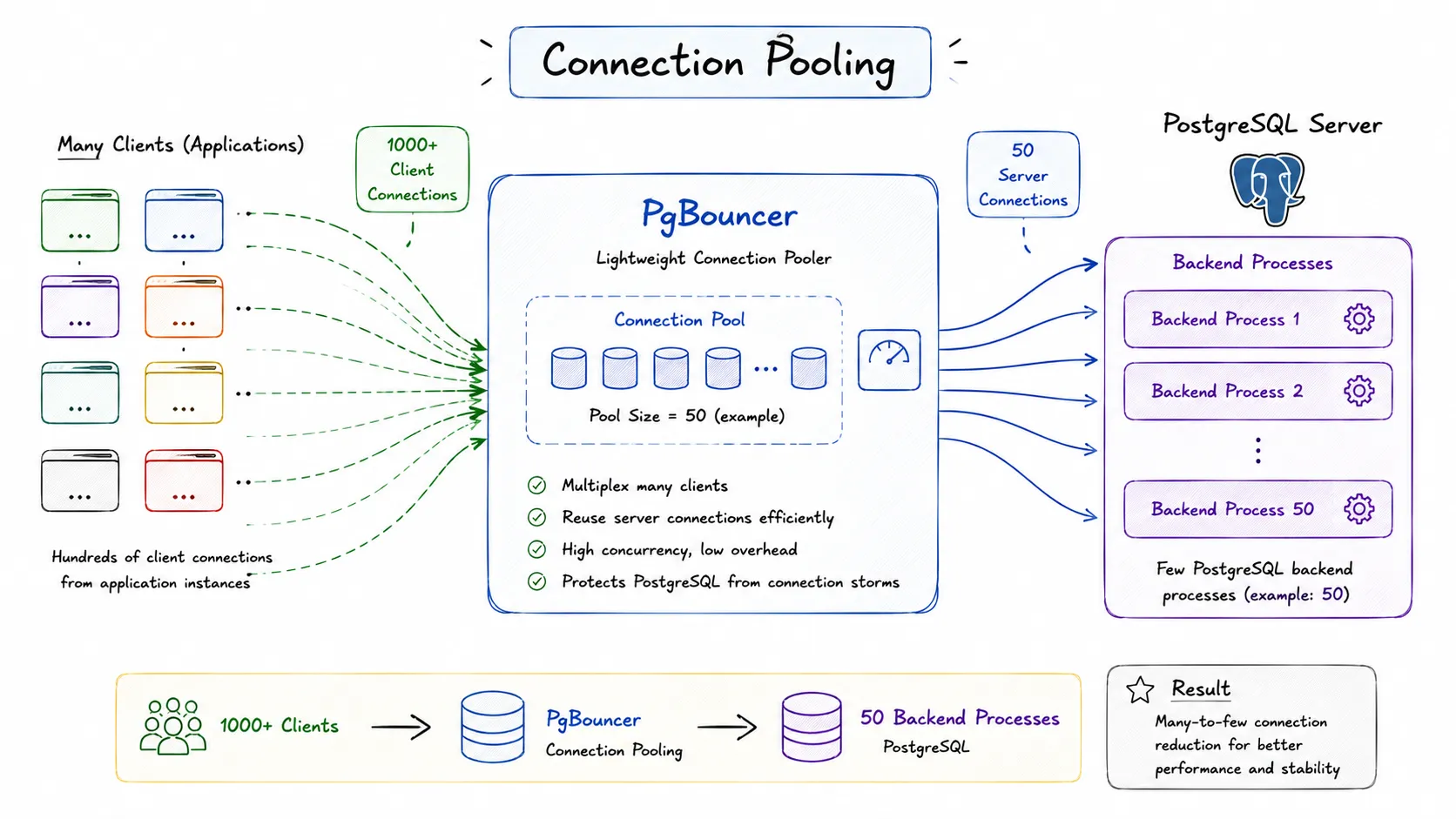
PostgreSQL is incredibly good at executing queries, but it is surprisingly expensive at simply accepting connections. The first time I learned that every PostgreSQL connection creates an operating system process, a lot of production problems suddenly made sense. Slow application startups, connection spikes, exhausted memory, and random too many clients errors usually have very little to do with query performance.
Connection pooling exists because PostgreSQL optimizes for isolation and reliability, not for handling tens of thousands of concurrent client connections.
Why PostgreSQL Uses Process-Per-Connection
Unlike many databases that use thread pools or event loops, PostgreSQL creates a dedicated backend process for every client connection.
The architecture looks roughly like this:
- Client connects.
- Postmaster accepts the connection.
- PostgreSQL forks a backend process.
- The backend owns that connection exclusively.
- The process terminates after disconnect.
Each backend process contains:
- Local memory contexts
- Session state
- Query execution state
- Temporary buffers
- Transaction information
- Locks and snapshots
This isolation is one reason PostgreSQL is extremely stable. A broken query or backend crash rarely impacts other sessions.
However, the downside becomes obvious when applications open hundreds or thousands of connections.

What Happens During Connection Creation
Opening a connection is much more expensive than sending a query.
PostgreSQL must perform:
- TCP handshake
- SSL negotiation
- Authentication
- Backend process creation
- Memory allocation
- Session initialization
- GUC loading
Even before the first query executes, substantial work has already happened.
For example:
ps aux | grep postgresYou might see:
postgres: app_user mydb 10.0.0.15 idle
postgres: app_user mydb 10.0.0.16 idle
postgres: app_user mydb 10.0.0.17 idle
Most production systems spend far more time waiting than executing queries.
The real problem is usually idle connections, not active queries.
Why Too Many Connections Hurt Performance
A common misconception is:
More connections means more throughput.
In reality, increasing connections eventually reduces performance.
Each backend process consumes:
- Memory
- Kernel resources
- Context switching overhead
- File descriptors
- Shared buffer access
Suppose:
- 500 application pods
- Each opens 20 connections
That creates:
500 × 20 = 10,000 connectionsPostgreSQL struggles long before that point.
The max_connections setting often looks like:
max_connections = 200Increasing it to:
max_connections = 1000usually makes things worse because:
- More backend processes.
- Higher memory consumption.
- More contention.
- More scheduler overhead.
Context Switching Cost
Operating systems continuously switch CPU execution between backend processes.
If 500 processes compete for CPU:
- Cache locality decreases.
- Scheduler overhead increases.
- Latency grows.
The database spends more time managing processes than executing queries.
This explains why a database server with 100 active queries may outperform one with 1000 connected clients.
The Real Purpose of Connection Pooling
Connection pooling allows applications to share a smaller number of PostgreSQL connections.
Instead of:
1000 application clients
↓
1000 PostgreSQL connections
We get:
1000 application clients
↓
50 pooled connections
↓
PostgreSQL
The database sees only 50 backend processes.
Applications still believe they have their own connections.
Benefits include:
- Lower memory usage
- Faster application startup
- Reduced connection storms
- Higher throughput
- Better database stability
This is exactly why PgBouncer exists.
How PgBouncer Sits Between Applications and PostgreSQL
PgBouncer is a lightweight connection proxy.
Applications connect to PgBouncer.
PgBouncer connects to PostgreSQL.
The architecture becomes:
Application
        ↓
    PgBouncer
        ↓
   PostgreSQL
Instead of creating backend processes for every client, PostgreSQL only sees pooled server connections.
PgBouncer itself is extremely lightweight because it uses an event-driven architecture.
One PgBouncer process can handle thousands of client connections.

Example Configuration
[databases]
appdb = host=postgres port=5432 dbname=appdb

[pgbouncer]
listen_port = 6432
listen_addr = *
auth_type = md5

default_pool_size = 50
max_client_conn = 1000
Applications then connect using:
postgres://user:password@pgbouncer:6432/appdbThe database may only see:
SELECT count(*)
FROM pg_stat_activity;
Result:
50while 800 clients are connected to PgBouncer.
Pooling Modes Inside PgBouncer
PgBouncer supports three pooling modes.
Session Pooling
A client receives one server connection for its entire session.
Client A
   ↓
Server Connection 1
The connection is released only after disconnect.
This mode preserves:
- Session variables
- Temporary tables
- Prepared statements
Compatibility is excellent, but efficiency is lower.
Transaction Pooling
A server connection is assigned only during a transaction.
BEGIN;
SELECT * FROM users;
COMMIT;
After commit:
Connection returned to pool.This is the most popular mode.
It dramatically increases connection reuse.
However, session state cannot be relied upon.
Statement Pooling
Every individual statement gets a server connection.
SELECT * FROM users;Connection immediately returns to the pool.
This provides maximum efficiency but breaks many application assumptions.

Transaction pooling gives the best balance between compatibility and performance.
How PgBouncer Works at the Protocol Level
PgBouncer understands the PostgreSQL wire protocol.
When the client sends:
Parse
Bind
Execute
Sync
PgBouncer reads these packets and forwards them to an available server connection.
When a transaction completes:
COMMITPgBouncer detaches:
Client → Server Connectionand returns the server connection to the pool.
The client socket remains connected.
From the application’s perspective:
Nothing changed.Internally:
Client A → Server 3
Client B → Server 7
Client A → Server 2
The mapping continuously changes.
This multiplexing is what makes PgBouncer extremely efficient.
Problems Transaction Pooling Can Cause
Many frameworks assume connections are permanent.
For example:
SET search_path = tenant1;In transaction pooling:
Next query may use another server connection.Similarly:
- Temporary tables break.
- Session variables disappear.
- LISTEN/NOTIFY may fail.
- Session prepared statements fail.
This is why many ORMs need special configuration.
Examples:
- Prisma recommends PgBouncer support.
- Django requires transaction awareness.
- Rails has specific pool settings.
Always verify your application’s assumptions before enabling transaction pooling.
Monitoring PgBouncer
PgBouncer exposes internal statistics.
Connect to:
psql -p 6432 pgbouncerView pools:
SHOW POOLS;View clients:
SHOW CLIENTS;View servers:
SHOW SERVERS;Useful metrics:
- Waiting clients
- Active servers
- Idle servers
- Average query time
- Pool saturation
If waiting clients continuously grow, the pool is too small.

Production Recommendations
My general rules are:
- Keep PostgreSQL connections low.
- Scale application clients independently.
- Use PgBouncer close to the database.
- Start with transaction pooling.
- Monitor waiting clients.
- Avoid increasing
max_connectionsfirst.
A typical setup might look like:
Node.js instances: 500
PgBouncer connections: 1000
PostgreSQL connections: 50
The database remains stable even during traffic spikes.
This topic also connects directly to:
- Shared buffers
- Query execution
- Autovacuum workers
- Lock contention
- Checkpoints
Because every backend process participates in those systems.
Understanding connection pooling changes how you think about database scalability. The bottleneck is often not query execution. It is simply the cost of maintaining too many backend processes.